Overview
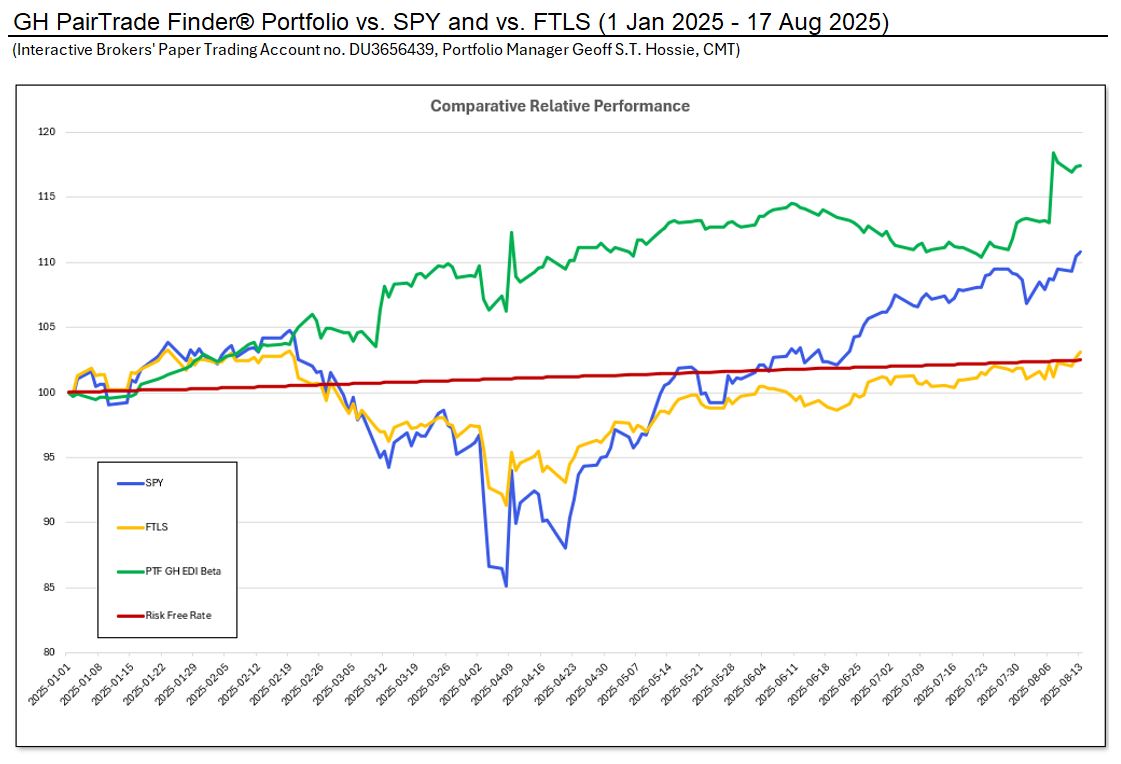
Please find below screen shots from Pairtrade Finder Version 2.50727, professional pair trading software. Built in is a complete stock trading system with buy and sell signals, back testing, charting and other analysis tools.
Console
This window gives you a birds eye view of your pairs. Here you can easily find entry and exit signals, and view all the different analysis readings for each pair. Simply click on a pair or multiple pairs and hit the analyze pair button to view each pair in greater detail.
Pair Analysis
This window gives you a detailed analysis of your chosen pair. Here you can see previous trade signals and ratio, RSI, correlation, spread and volatility charts to give you further conviction in taking a trade signal. You can also compare the fundamentals of each stock in the pair.
Back Tester
Here you can backtest your chosen stock group. The program will automatically match up every stock against one another and produce correlation readings and the profit produced using the programs signals for the past year. You can easily add these pairs to your watchlist.
Stock Chart Comparison
Here you can view the stock chart of every stock and compare multiple stocks against one another.
Portfolio Manager
This is where you keep track of all your trades. You can add trades straight from the analysis window and export to excel.
Candlestick Chart
In this window you can view a candlestick chart of an individual stock and the daily trading information.
Intraday Spread Chart
This chart is the intraday dollar difference between the two stocks in your pair. You can use this chart to pinpoint your entries and exits.
Not Convinced Yet ?
Please Download a 30 Day FREE Trial Now and see for yourself.